


What Should a Professional Business Website Include? A Checklist for Abu Dhabi Businesses
A professional business website should include a clear homepage, essential pages (Home, About Us, Services or Products, Contact), easy navigation, trust-building content, mobile-friendly design, visible calls to action, a search-friendly structure, fast and secure performance, and room to grow. If a visitor can understand what you offer, trust you and contact you within a few seconds, the website is doing its job.
For most businesses in Abu Dhabi, the website is the first place a customer checks before calling, visiting or requesting a quote. It supports your credibility, answers questions before they reach your team and turns searches into enquiries. A site that is unclear, slow or hard to use on a phone can lose that customer before you ever hear from them.
This guide is a practical checklist in ten parts. Use it to review an existing website or to plan a new one, with local considerations for Abu Dhabi along the way.
1. A Clear Homepage
Your homepage should tell visitors three things in the first screen: what your business does, who it serves, and what to do next.
A strong homepage usually includes:
- A value proposition: one or two sentences that state what you offer and why it matters. "Accounting and VAT support for small businesses in Abu Dhabi" says far more than "Welcome to our website."
- A primary call to action: one clear next step, such as "Request a quote" or "Book a consultation."
- A short overview of services or products, with links to the full pages.
- A trust signal: a client logo, a short testimonial, a certification or a years-in-business figure.
- Contact details in the header or footer, so they are always within reach.
Avoid long slideshows, vague slogans and walls of text. Visitors should not have to scroll or guess to understand your business.
2. Essential Website Pages
The essential pages for a business website are Home, About Us, Services or Products, and Contact. Add a Frequently Asked Questions page where it helps visitors decide.
| Page | What it should do |
|---|---|
| Home | Explain what you do, who you serve and what to do next |
| About Us | Show who is behind the business, your experience and your values |
| Services or Products | Describe each offering clearly, ideally on its own page |
| Contact | Give phone, email, address, map, hours and an enquiry form |
| FAQ (where useful) | Answer common questions about pricing, process, timelines and requirements |
If you offer several distinct services, give each its own page. Separate pages are easier for visitors to scan and give search engines a clearer picture of what you do. Our web design team plans this page structure with every new site.
3. Easy Navigation and Page Structure
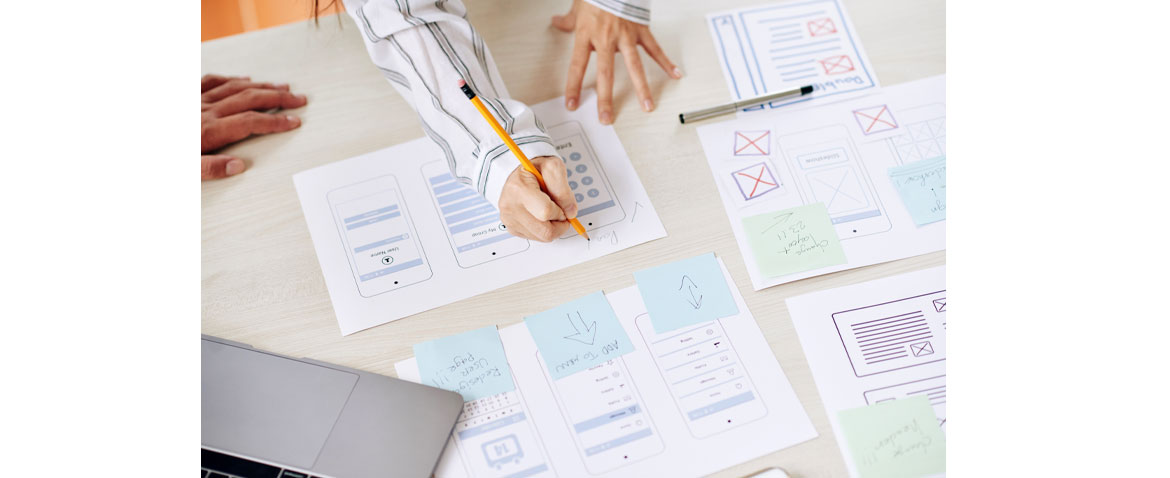
Good navigation lets visitors find what they need in two or three clicks. Use a simple main menu with descriptive labels such as "Services," "About" and "Contact," not clever names that need explaining.
- Keep the main menu to five to seven items.
- Group related services under one menu heading.
- Use the same menu on every page.
- Link related pages to each other, for example from a service page to a relevant case study.
- Include a footer with key links and contact details.
This structure is part of what separates a professional-looking site from a cluttered one. A well-planned UI/UX design process maps how visitors move through the site before any page is designed.
4. Clear Service or Product Information
Visitors should be able to understand what you sell without calling you. Describe each offering in plain language, avoiding jargon your customers do not use.
For each service or product, cover:
- What it is and who it is for.
- The benefits: what problem it solves or what result the customer gets.
- How it works: the steps, timeline or process.
- Relevant details: what is included, requirements, and how pricing works (a starting price or "request a quote" note both help).
- A next step: a button or form on the same page.
If you sell online, product pages also need clear photos, prices, delivery information and a simple checkout. A dedicated e-commerce web development build can handle these needs as the catalogue grows.
5. Trust-Building Content
People judge a business quickly, and a website is often the only evidence they see. Trust signals reduce doubt and make an enquiry feel safer.
Use what is true and available to you:
- Accurate business details: company name, address, phone, email and trading hours that match your other listings.
- Testimonials and reviews from real customers, ideally with a name and company.
- Case studies or portfolio examples that show the problem, your approach and the result.
- Certifications, licences, partnerships and awards, where relevant to your industry.
- Team information: names and photos of key people make the business feel real.
- Client logos, with permission.
Only publish claims you can support. If you are a new business without reviews yet, lead with your experience, your process and clear guarantees or service terms instead.
6. Mobile-Friendly Design
Yes, a business website needs to be mobile-friendly. Many visitors will first open your site on a phone, and search engines evaluate the mobile version of a page when deciding how it performs. A site that is hard to read or tap on a small screen loses enquiries.
A mobile-friendly website has:
- Text that is readable without zooming.
- Menus that are easy to open and use with a thumb.
- Buttons and links spaced far enough apart to tap accurately.
- Forms that are short and easy to complete on a phone.
- Images that resize without slowing the page.
- A tap-to-call phone number.
Test the site on a phone and a tablet, not just a desktop screen. Professional responsive web design means each page adapts to the visitor's device instead of shrinking a desktop layout.
7. Contact Details and Calls to Action
A website generates enquiries when the next step is obvious. Give visitors several easy ways to reach you, then place those options where they are likely to need them.
Options worth offering:
- A phone number that works with tap-to-call.
- An email address and a short enquiry form.
- A WhatsApp or messaging link, if your customers use it.
- A request-a-quote or book-a-consultation form.
- A map and address if customers visit you.
Place a call to action in the header, on the homepage, at the end of each service page and in the footer. Make the wording specific: "Get a free quote" is stronger than "Submit." Keep forms short, ask only what you need and test them regularly so enquiries never go missing.
For Abu Dhabi businesses, consider the channels your customers actually use. In a multilingual market, offering contact options in both English and Arabic can make the difference between a visit and a bounce.
8. Search-Friendly Structure
A website that nobody finds cannot generate enquiries. Search engine optimisation (SEO) works best when it is planned from the start, not added after launch.
The building blocks are simple:
- Descriptive page titles and meta descriptions that include what the page is about and where you operate.
- A clear heading structure: one H1 per page, with H2 and H3 headings that organise the content.
- Useful content that answers the questions your customers actually ask.
- Logical internal links between related pages.
- Descriptive image names and alt text.
- Location signals: your Abu Dhabi address, service areas and a consistent business profile across directories, including your Google Business Profile.
- Clean, readable URLs, such as /services/web-design.
Building these in during the design and web development stages is cheaper and more effective than fixing them later. Ongoing SEO services can then build on that foundation.
Clear, well-structured pages also help AI-powered search tools and assistants understand and summarise your business accurately. The same habits that help people, such as direct answers, plain headings and consistent facts, tend to help these tools too.
9. Speed, Security and Ongoing Maintenance
A professional website loads quickly, protects visitors and stays up to date. Slow, outdated or insecure sites lose trust fast.
- Speed: compress images, avoid unnecessary scripts and use reliable hosting. Visitors rarely wait for a page that drags.
- Security: use HTTPS (a secure connection) on every page, keep software and plugins updated and use strong admin passwords.
- Backups: keep regular, tested backups so you can recover quickly if something breaks.
- Working forms: test enquiry forms and email notifications on a schedule so no lead is lost.
- Content upkeep: review contact details, services, prices and team information regularly.
- Data and privacy: if you collect personal information through forms, say how it is used and check the data protection requirements that apply to your business in the UAE.
How often should a business website be updated? Review core content at least every few months, and update immediately when services, prices, hours or contact details change. Software updates and backups should run on a regular schedule, not only when something goes wrong.
10. A Website That Can Grow with the Business
Your website should support where the business is going, not just where it is today. When you choose the structure and platform, think about:
- New services or product lines that will need their own pages.
- Additional languages, such as adding Arabic alongside English, including right-to-left layouts.
- Online features, such as booking, payments, customer accounts or an online shop.
- Integrations with your CRM, email marketing or accounting tools.
- More content, such as a blog, case studies or a resource centre.
A flexible structure lets you add these without rebuilding the site. If your current website cannot grow, a planned redesign is usually better than patching it repeatedly.
Business Website Checklist
Use this list to review your website. If you cannot tick an item, that is where to start.
- ☐ The homepage states what you do, who you serve and the next step
- ☐ Home, About, Services or Products and Contact pages exist
- ☐ Menus are simple and pages have descriptive names
- ☐ Each service or product is explained in plain language
- ☐ Testimonials, case studies, certifications or portfolio examples are shown
- ☐ The site works well on phones and tablets
- ☐ Phone, email and enquiry options are easy to find
- ☐ Calls to action appear on key pages
- ☐ Page titles, headings and internal links are clear and consistent
- ☐ Pages load quickly and use HTTPS
- ☐ Backups, updates and form tests are scheduled
- ☐ Content is current, and the structure can grow with the business
Frequently Asked Questions
What pages should every business website have?
Every business website should have a Home page, an About Us page, a Services or Products page and a Contact page. A Frequently Asked Questions page is also useful where customers ask the same questions repeatedly.
What information should be on a business homepage?
A business homepage should explain what the company does, who it serves and what visitors should do next. It should include a clear value proposition, a main call to action, a short overview of services, a trust signal and visible contact details.
What makes a business website look professional?
A professional website has a clean layout, consistent branding, readable text, clear navigation and accurate content. It loads quickly, works on mobile devices, uses a secure connection and shows real evidence of the business, such as testimonials or project examples.
Does a business website need to be mobile-friendly?
Yes. Many visitors browse on phones and tablets, and search engines assess the mobile version of your pages. Text, menus, buttons and forms should all be easy to use on a small screen.
How can a website help generate customer enquiries?
A website generates enquiries by explaining your offer clearly, building trust and making the next step easy. Use visible calls to action, short forms, tap-to-call numbers and specific wording such as "Request a quote." Check regularly that forms and email notifications work.
Should a business website include customer reviews or project examples?
Yes, where you have them. Reviews, case studies and portfolio examples show real results and reduce the doubt a new customer feels. Use genuine, permitted material and avoid claims you cannot support.
What should businesses in Abu Dhabi consider when planning a website?
Abu Dhabi businesses should consider English and Arabic content, local contact options, a consistent business profile for local search, and mobile use. Plan for additional languages early, so the site can support right-to-left layouts later without a rebuild.
How often should a business website be updated?
Review core content every few months and update straight away when services, prices, hours or contact details change. Apply software updates and run backups on a regular schedule.
Conclusion
A professional business website is clear, trustworthy, easy to use on any device and built to turn visitors into enquiries. Review your site against the checklist above, note the gaps, and plan improvements in order of impact. Starting with the homepage, contact options and mobile experience usually delivers the quickest gains.
Planning a new business website or considering a redesign? Contact Integrate IT Solutions to discuss your web design and web development requirements in Abu Dhabi. You can also see examples in our web design portfolio.